Colorful Personalities
In this step, we're going to add some flair to our chatbot by assigning different colors to each persona. This will visually distinguish the different personalities, making the conversation more engaging and fun!
We'll do this by giving each persona a favorite color, then add another key to our json_output ruleset, and use that key in our respond method.
Updating Rulesets
Favorite Colors
To assign colors to each persona, we'll add new rules to each of our identity ruleset to give them all favorite colors. You're welcome to use Standard Colors, Hex, or RGB values. Whatever makes you happy.
kiwi_ruleset = Ruleset(
    name = "kiwi",
    rules = [
        # ... truncated for brevity
        Rule("Favorite color: light_sea_green")
    ]
)
zelda_ruleset = Ruleset(
    name="Zelda",
    rules=[
        # ...
        Rule("Favorite color: light_pink3")

    ]
)
dad_ruleset = Ruleset(
    name="Dad",
    rules=[
        # ...
        Rule("Favorite color: light_steel_blue")
    ]
)
Add Key
We also need to make changes to the json_ruleset to include the Favorite Color key. Modify the first rule to include that key:
json_ruleset = Ruleset(
    name="json_ruleset",
    rules=[
        Rule("Respond in plain text only with valid JSON objects that have the following keys: response, favorite_color, continue_chatting."),
        # ...
    ]
)
Respond Method
Next, we'll adjust the respond method get the favorite color, and use it properly.
Get the color
After the continue_chatting = data["continue_chatting"] line, add one to get the color:
class MyAgent(Agent):
    def respond(self, user_input):
        # ...
        continue_chatting = data["continue_chatting"]
        color = data["favorite_color"]
        # ...
Use it
Then, update the style line in the rprint statement to use color instead of specifying it directly as we were before:
class MyAgent(Agent):
    def respond(self, user_input):
        # ...
        rprint(Panel.fit(
            formatted_response,
            width=80,
            style=Style(color=color)
        ))
        # ...
Try it
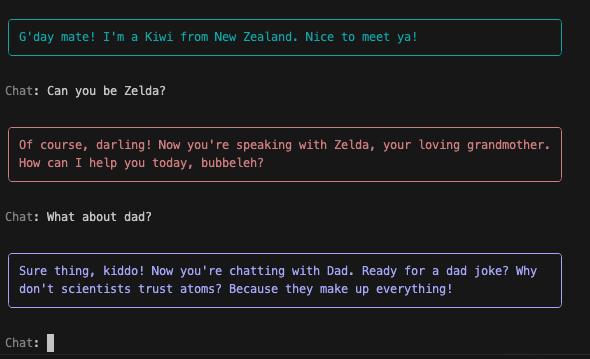
Run the code and notice how much nicer it is to be able to discern who is talking based on their color.
Adding a Name
We're not quite finished yet. We also can make things a bit easier to follow if we clarify the name of the persona we're chatting with.
Update Ruleset
This will be a relatively quick fix. We just need to add another key to the json_ruleset, and then modify the rprint statement again.
First, add the name key:
json_ruleset = Ruleset(
    name="json_ruleset",
    rules=[
        # ...
        Rule("Respond in plain text only with valid JSON objects that have the following keys: name, response, favorite_color, continue_chatting."),
        # ...
    ]
)
Get the Name
Now get the name from the json data in the respond method of the MyAgent class:
class MyAgent(Agent):
    def respond(self, user_input):
        # ...
        color = data["favorite_color"]
        name = data["name"]
        # ...
Use it
Then, add a title and title_align in the rprint function:
class MyAgent(Agent):
    def respond(self, user_input):
        # ...
        rprint(Panel.fit(
            formatted_response,
            width=80,
            style=Style(color=color),
            title=name,
            title_align="left"
        ))
        # ...
Try it
Give it a try and see how much nicer it is!

Code Review
Lots of changes in this section, with some great usability enhancements!
| app.py | |
|---|---|
1 2 3 4 5 6 7 8 9 10 11 12 13 14 15 16 17 18 19 20 21 22 23 24 25 26 27 28 29 30 31 32 33 34 35 36 37 38 39 40 41 42 43 44 45 46 47 48 49 50 51 52 53 54 55 56 57 58 59 60 61 62 63 64 65 66 67 68 69 70 71 72 73 74 75 76 77 78 79 80 81 82 83 84 85 86 87 88 89 90 91 92 93 94 95 96 97 98 99 100 101 102 103 104 105 106 107 108 109 110 111 112 113 114 115 116 117 118 119 120 121 122 123 | |
Next Steps
In the next section: Quick Feedback, we'll make the chatbot feel a bit more responsive to user input by giving it a spinner so it doesn't feel like it's lagging while the LLM is fetching it's response.