Markdown Madness
In this stage, we'll enhance our chatbot's code display by harnessing the power of Markdown. With Markdown, we can beautifully format and highlight code snippets to make them more readable and visually appealing.
Review
First, let's see why our current output doesn't work. Ask the chatbot to do something useful - like create a bash script that will create an alias to launch VS Code.

As you can see, the script is fine, but it doesn't look like a script. It looks like something you'd enter in a Markdown file that you'd expect to eventually be rendered as a script. We're going to make this look much nicer.
Markdown
Import
To get started, we need to update our imports by adding the Markdown class.
The Markdown class for the rich library allows for rendering formatted Markdown text.
Using it
Next, we'll modify the respond method to use the Markdown class. There are a few things we'll need to do. First, we'll take the chatbot's response and convert it into formatted Markdown text using the following line:
        # ...
        response = data["response"]
        continue_chatting = data["continue_chatting"]

        formatted_response = Markdown(response)
        # ...
Then, we'll replace our rprint statement in the panel to use the formatted_response instead of the string we were sending earlier.
Warning
Make sure you don't do something like rprint(Panel.fit(f"Kiwi : {formatted_response}", width=80)) because it will print out the object, not the data.
Here's the new respond method in its entirety:
# Create a subclass for the Agent
class MyAgent(Agent):

    def respond (self, user_input):
        agent_response = self.run(user_input)
        data = json.loads(agent_response.output_task.output.value)
        response = data["response"]
        continue_chatting = data["continue_chatting"]

        formatted_response = Markdown(response)

        rprint("")
        rprint(Panel.fit(formatted_response, width=80))
        rprint("")

        return continue_chatting
Update Ruleset
Finally, we'll change our json_ruleset to ensure the response works with Markdown.
Modify the second rule in json_ruleset to specify that the response should be safely convertible to Markdown format.
        # ... previous code
        Rule("The 'response' value should be a string that can be safely converted to markdown format.  Use '\\n' for new lines."),
        # ...
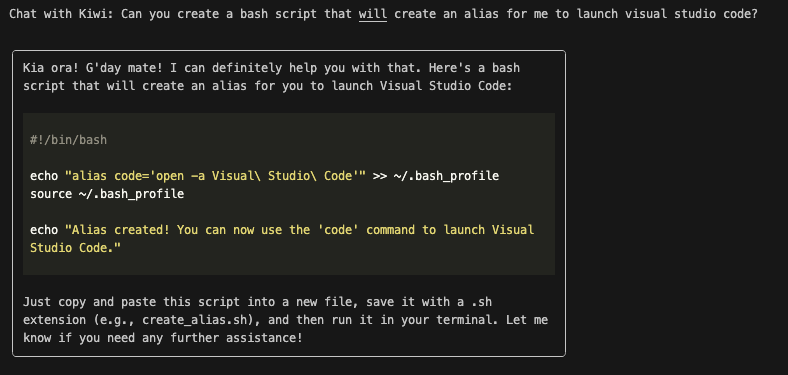
To see the enhanced code display in action, run your chatbot and observe the beautifully formatted code snippets that were previously plain text. Try creating tables, CSV files, python scripts, task lists, etc. Enjoy the new level of elegance and readability brought by Markdown magic!
Code Review
Before moving forward, make sure your code works as expected.
Next Steps
In the next section: Improving the Prompt, we'll continue making things better by improving the appearance of the prompt.